Permissions
The plugin ships a set of capabilities that are populated automatically when it is installed. Most of them apply at the activity (module) level, so teachers can override the default restrictions on a per-activity basis from Activity → Permissions.
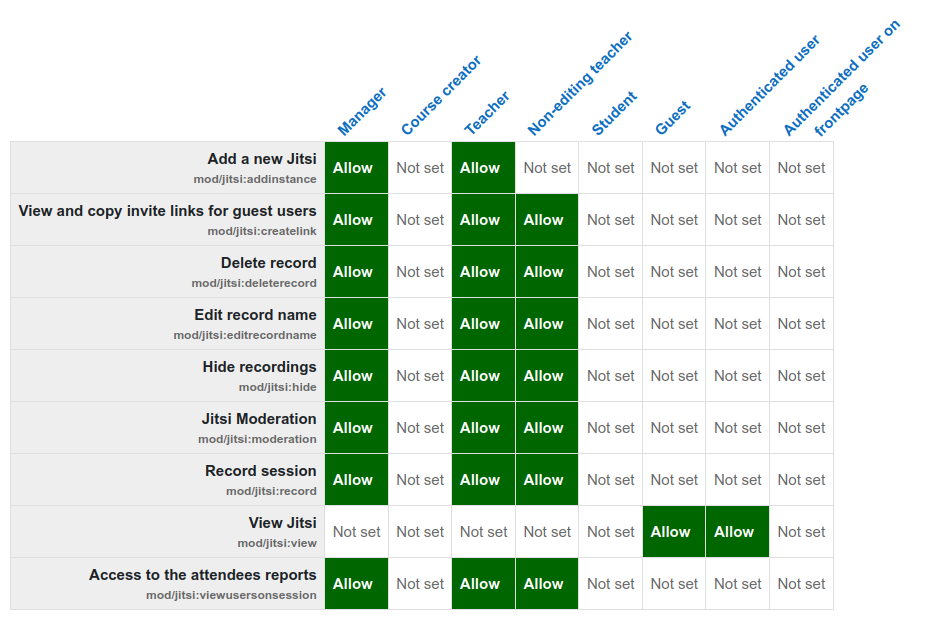
Capabilities
Each capability below shows its identifier, what it controls, the context where it
applies and the roles it is granted to by default (the archetypes defined in the
plugin's db/access.php).
| Capability | What it controls | Default roles |
|---|---|---|
mod/jitsi:addinstance |
Create Jitsi activities in a course. Cloned from moodle/course:manageactivities. (Course context.) |
Editing teacher, Manager |
mod/jitsi:view |
See and access Jitsi activities in the course view. | Guest, Authenticated user |
mod/jitsi:moderation |
Determines who is a moderator in sessions. With token configuration enabled, only users with this capability are promoted to Jitsi moderator and shown a moderator indicator; without it, moderator-only buttons (mute-everyone, kick participant) are merely hidden from non-moderators and may be bypassed by experienced users. | Editing teacher, Teacher, Manager |
mod/jitsi:record |
Start recordings and manage external recording links. You can build sessions where students record themselves. | Editing teacher, Teacher, Manager |
mod/jitsi:viewusersonsession |
Access the attendees report — see who is currently in a session. You may want to grant this to students. | Editing teacher, Teacher, Manager |
mod/jitsi:hide |
Hide recordings. Consider preventing non-editing teachers from hiding recordings. | Editing teacher, Teacher, Manager |
mod/jitsi:deleterecord |
Mark a recording as deleted (set private on YouTube; later removed by the cron_task_delete scheduled task or by an admin). Consider preventing non-editing teachers from deleting recordings. |
Editing teacher, Teacher, Manager |
mod/jitsi:editrecordname |
Rename the title of a recording. Consider preventing non-editing teachers from renaming recordings. | Editing teacher, Teacher, Manager |
mod/jitsi:createlink |
View and copy invite links for guest users. A teacher may allow students to share guest invitation links. | Editing teacher, Teacher, Manager |
mod/jitsi:viewrecords |
Access the Recordings tab. Disable this to hide recordings from specific roles. | Guest, Authenticated user |
mod/jitsi:viewexternallink |
View externally-linked recordings (Dropbox, 8x8, manual links). | Editing teacher, Teacher, Manager |
mod/jitsi:generateaisummary |
Generate AI-powered summaries for GCS recordings. Requires AI features to be enabled. | Editing teacher, Manager |
mod/jitsi:generateaiquiz |
Generate AI-powered quizzes from GCS recordings. Requires AI features to be enabled. | Editing teacher, Manager |
mod/jitsi:generateaitranscription |
Generate AI transcriptions for GCS recordings. Requires AI features to be enabled. | Editing teacher, Manager |
mod/jitsi:viewattendance |
Access the detailed attendance report with recording view tracking. Requires a mod_jitsi Account. | Editing teacher, Teacher, Manager |
Default role names
"Editing teacher", "Teacher" (non-editing), "Manager", "Guest" and "Authenticated
user" correspond to Moodle's standard archetypes (editingteacher, teacher,
manager, guest, user). Your site's actual role definitions may differ if they
have been customised.
AI capabilities are teacher-only by default
The three AI capabilities (generateaisummary, generateaiquiz,
generateaitranscription) are granted only to editing teachers and managers —
non-editing teachers do not get them by default.