When a macOS update took down my server… and the bot that should have warned me sabotaged itself
ContenidoContents
I have a Mac mini under my desk acting as a 24/7 server. It serves sergiocomeron.com, the Meet, the Moodle classroom, the blog and a few other bits, all behind a Cloudflare Tunnel. It had been running like clockwork for months. Until one night I launched a system update… and the party started.
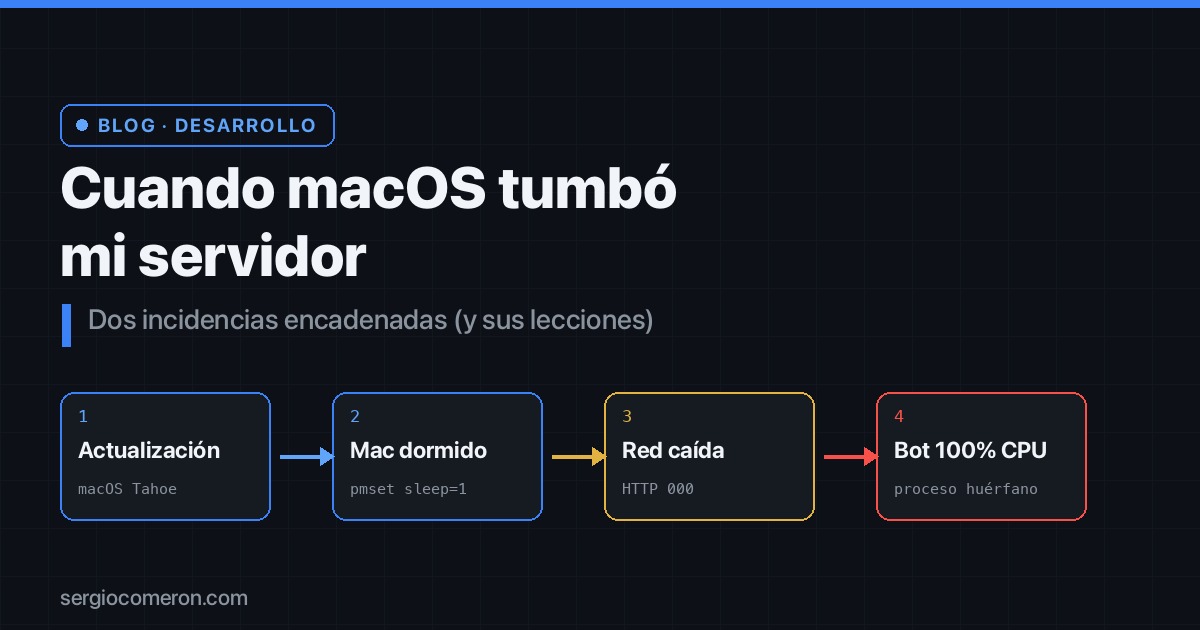
This is the story of two chained incidents over two days: one that had my server going down like a ghost, and another in which the very tool meant to warn me about problems became the problem. With its captures, its logs and, at the end, its lessons.
Act 1: the phantom outages
On the night of June 1 I launched a macOS update before going to bed. At 22:16 it was installed; at 22:19, the reboot. And off I went to sleep, blissfully unaware.
$ softwareupdate --history
macOS Tahoe 26.5.1   26.5.1   01/06/2026, 22:16:31

$ sw_vers
ProductVersion: 26.5.1   BuildVersion: 25F80
The next morning, my phone was on fire. The monitor had fired a collection of increasingly alarming alerts:
- “Wrong content: meet.sergiocomeron.com”
- “Missing security headers: sergiocomeron.com”
- “HTTP does not redirect to HTTPS — HTTP code: 000”
- And from the Cloudflare tunnel: “failed to accept QUIC stream: … network is down”
The first instinct, let’s admit it, is to fear the worst: I’ve been hacked, something’s down, someone’s messing with the config. But if you look closely, the alerts are too varied for a single real cause… and that’s the clue. Especially that HTTP 000. A 404 is “doesn’t exist”; a 500 is “the server blew up”; but a 000 means there was no connection at all. It’s not that the site responded badly: it didn’t respond at all. That doesn’t smell like a hack, it smells like the server simply wasn’t there.
And where was it? Asleep. The answer showed up in the power logs:
$ pmset -g log | grep -E "Entering Sleep|DarkWake"
2026-06-01 23:35:58  Sleep      Entering Sleep state due to 'Idle Sleep'
2026-06-02 09:57:58  Sleep      Entering Sleep state due to 'Maintenance Sleep':TCPKeepAlive=active  144 secs
2026-06-02 10:00:22  DarkWake   DarkWake from Deep Idle ... Enet.TCPData
2026-06-02 10:01:07  Sleep      Entering Sleep state due to 'Maintenance Sleep'  39 secs
... (98 sleep/wake cycles since boot)
Ninety-eight cycles. The Mac had spent the whole night falling asleep and waking up like a newborn. Broken down by hour, the pattern is textbook:
23h → 5    03h → 5    07h → 9
00h → 8    05h → 6    08h → 5
01h → 3    06h → 4    09h → 30
02h → 4               10h → 12
And why didn’t any alarm fire overnight? Because a sleeping machine runs nothing and has no network: while the Mac was drifting in and out of sleep, neither the monitor’s checks ran nor was there any way for an alert to go out. The alerts only arrived at 10:00, when it was finally awake long enough for a check to run, see there was no response, and manage to send the alert.
The root cause? The update had reset the power configuration to factory defaults. A Mac fresh out of the box is set up to sleep, because it’s assumed to be someone’s laptop, not a server. And there was the culprit, in plain sight:
$ pmset -g custom
sleep      1     ← the culprit
powernap   1
displaysleep 10
sleep 1 means “go to sleep after one minute of inactivity”. For a laptop, perfect. For a server that has to be awake 24/7, an intermittent death sentence. The fix was to lock it down so it never sleeps, and in a way that persists across reboots:
$ sudo pmset -a disablesleep 1
$ sudo pmset -a sleep 0
$ sudo pmset -a powernap 0

$ pmset -g | grep -i SleepDisabled
SleepDisabled   1     ← locked down
Server awake again. Crisis one, solved. Or so I thought.
Act 2: the watchman’s sabotage
The next day, a new alert: hot CPU. Something had been pinned at 100% of a core for over 30 hours.
$ ps -Ao pcpu,time,command -r | head
%CPU   TIME        COMMAND
100.2  1835:50.81  /Users/.../.bun/bin/bun server.ts
One thousand eight hundred and thirty-five minutes of CPU. More than a full day burning a core flat out. The culprit? Let’s look at the process family:
$ ps -Ao pid,ppid,pcpu,lstart,command | grep bun
43741  43732  100.0  Tue Jun 2 12:00:28 2026  bun server.ts
43732      1    0.0  Tue Jun 2 12:00:28 2026  bun run ... claude-plugins/telegram/0.0.6 ... start
And here the irony starts to sink in. The process wasn’t the web, nor the server, nor anything serving anyone. It was the Telegram plugin for Claude Code: the very tool I use to get warned about problems. The watchman. Notice the PPID=1 too: it was orphaned. Its parent process had died and the system had adopted it, leaving it spinning in the void.
Why did it run wild? Because of the previous day’s incident. The plugin talks to Telegram via long-polling: it asks “any messages?”, waits, asks again. With the unstable network from the sleep night, those requests started failing, and it entered a retry loop that ate a whole core.
But the good part —the really good part— is this. The plugin has a safety mechanism for exactly this. A watchdog that every 5 seconds checks whether it has been orphaned and, if so, shuts itself down cleanly:
1// from the plugin's code (server.ts):
2const bootPpid = process.ppid
3setInterval(() => {
4  const orphaned = process.ppid !== bootPpid
5                || process.stdin.destroyed
6                || process.stdin.readableEnded
7  if (orphaned) shutdown()
8}, 5000).unref()
A flawless design. Except for one detail: that setInterval needs the CPU to give it a slot to run… and the CPU was at 100%, trapped in the retry loop. The timer never got to fire. The self-protection mechanism was disabled by the very failure it was meant to solve. The watchman, kidnapped by the same fire it was supposed to put out.
The fix, once identified, was trivial:
$ kill -9 43732 43741     # it relaunched on its own, clean
$ ps -Ao pcpu,command -r | grep bun
0.1  bun server.ts        # from 100% to 0.1%
I reconnected the Telegram channel, sent a test message, received it. All in order.
Epilogue: the bug was already reported
Before rushing off to open a GitHub issue, I did what should be everyone’s first reflex: check whether the problem was already reported. And boy, was it. The plugin is Anthropic’s official one (public repo anthropics/claude-plugins-official), and there were over a dozen open issues describing exactly the same thing: the orphaned bun process pinned at 100% CPU, the watchdog that doesn’t fire, the runaway polling loop. Several were specific to version 0.0.6, the very one I had.
And there’s the first community lesson: when you hit a bug like this, the first thing is to look for duplicates. Opening issue number twelve, identical to the previous eleven, helps no one; it just adds noise for whoever has to fix it. On top of that, 0.0.6 was the latest published version, so there wasn’t an update waiting to solve it either.
But not duplicating is one thing, and not contributing is another. Instead of opening a new thread, I commented on one of the existing issues (#1916) with three details that weren’t in the conversation and that help reproduce —and fix— the bug:
- It happens on Apple Silicon too. The original thread was on an Intel Mac; mine is a Mac mini with an Apple chip, so the bug isn’t an architecture thing.
- The trigger wasn’t what they thought. The issue attributed it to “two sessions fighting over the token”. But in my case the trigger was the sustained network loss from Act 1. That suggests the retry loop also runs wild on network errors, not just on the 409 conflicts of two simultaneous sessions.
- The finest detail, the watchdog one. That mechanism meant to self-destruct the orphaned process never fired… and not just because of the 100% CPU. It checks its direct parent process, but the one that ended up orphaned (adopted by PID 1) was the intermediate
bun runwrapper, not theserver.tsthat runs the watchdog. The orphaning happened one level above the watchman, where it wasn’t looking. (I linked it to issue #1604, which points to the same root cause.)
And that’s the moral of this epilogue: a good bug report isn’t “I found a bug” —eleven people knew that before you— but “here’s a new data point to reproduce or fix it”. Contributing to an existing issue, even with a single missing observation, is worth more than opening number twelve.
Three lessons from two eventful days
- macOS updates can reset your configuration without warning. If you use a Mac as a server, it’s not paranoia to check
pmset(and whatever else) after every update. The system assumes your server is someone’s laptop. - An
HTTP 000or a “network is down” is almost never a hack. It’s a lack of connectivity. Breathe, don’t panic, and diagnose from the simplest to the most far-fetched. - Failures chain together. A network problem can take down tools that in theory have nothing to do with each other, and even disable their own self-protection mechanisms. When something weird happens, always ask yourself: is this the cause, or the consequence of something that happened earlier?
Self-hosting on a Mac mini has something addictive about it: total control, zero bills, and tinkering with your own infrastructure. But it’s worth remembering that, underneath, it’s still a consumer machine pretending to be a server. And every now and then, it reminds you.